
Import
Open RAW, JPEG, and HEIC images from Photos or Files. Drag and drop on iPad. Your library remembers every photo’s edit state.
AnyLUT brings camera RAW files, your own 3D LUTs and an editing assistant into one focused workflow. Import, preview, adjust, export. Every change is a normal control you can see and undo, with no camera lock-in and nothing between you and the image.
iPhone + iPad · iOS 17+ · Now on the App Store
Built around photography, not software operation. Every step is reversible, every adjustment is stored as a recipe, and the source file is never overwritten.
Open RAW, JPEG, and HEIC images from Photos or Files. Drag and drop on iPad. Your library remembers every photo’s edit state.
Preview every LUT on the current image, then refine light, color, curves, HSL, detail, masks, fringing, noise reduction, and crop.
Free exports a JPEG in sRGB, up to 2048 px on the long edge. Pro exports the photo’s own size, as HEIC or in Display P3. The original RAW remains untouched from start to finish.
AnyLUT does not treat .cube files as an add-on. Real previews, favorites, folders, renaming, batch application, and intensity control are built into the workflow.
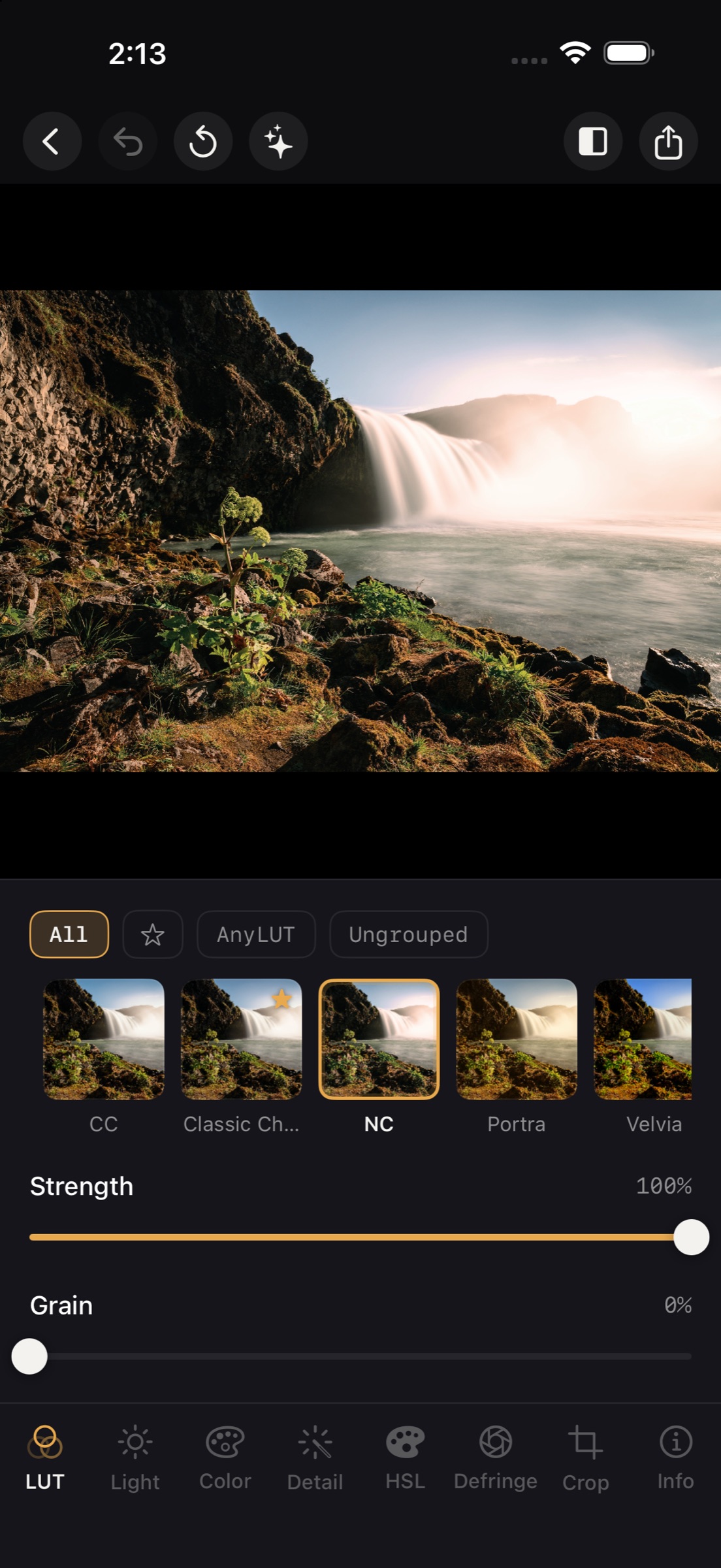
Every LUT card is rendered from the photo you are editing—not a stock image. Import standard 3D .cube files, organize folders, favorite go-to looks, and dial intensity from 0–100%.
Exposure, highlights, shadows, white and black points, white balance, vibrance, tone curve, eight-channel HSL, gradient map, texture, clarity, dehaze, purple and green defringe, luminance and color noise reduction at the Apple RAW decode stage, and local masks: brush, gradient, person, face, skin. The curve, HSL and gradient map tools are switched on in Settings › Advanced Tools.
Describe a look in a sentence. The assistant proposes changes to the ordinary controls: exposure, color, HSL, a curve, a mask. You see each change, apply it or not, and fine-tune it by hand. It never repaints the photo, and it replies in the language you write in.
It runs on the model in your iPhone or iPad, free, on devices that support it. With Pro you can use your own key for Claude, ChatGPT, or any OpenAI-compatible service. With the on-device model nothing leaves your device. With your own provider, that provider receives your request and a small preview of the photo (longest side 768 px).
RAW development, editing, and export happen on your device without an account. If you choose to publish to Discover, your selected preview and shared LUT or Recipe are uploaded and made public; an account is required outside mainland China. Optional analytics do not include photos or photo content and can be disabled in Settings.
Core editing works without an account or photo upload. Publishing to Discover is optional and makes your chosen preview and shared asset public.
AnyLUT uses Apple’s system RAW decoder. Exact camera coverage evolves with iOS and targets major formats from Sony, Canon, Nikon, Fujifilm, OM System / Olympus, Panasonic, and more.
No. Adjustments are stored as parameters, and previews and exports are regenerated from the source file.
Yes. Import standard 3D .cube files from Files, or drag them directly into AnyLUT on iPad.
Editing is free, with no watermark and no limit on the LUTs you import. Pro adds full-size export, HEIC, Display P3, local masks, sharing LUTs, and your own AI provider. See Pricing.
A Recipe saves the adjustments you choose as an .anylutrecipe file and applies only those items to another photo. Making one and keeping it in the app is free. Saving it to Files or sharing it to Discover is a Pro feature. Recipes work only in AnyLUT.
They are off by default, to keep the tool strip short. Turn them on in Settings › Advanced Tools. Adjustments you already made stay in the photo either way.
No. The assistant only moves the same controls you have, and you approve its changes before they apply. It does not generate or replace pixels.
AnyLUT is available on the App Store for iPhone and iPad.